Digital

VARA FM / Packet Dual-Mode Winlink Gateway in Linux

As you might have read earlier in this blog, I put up a VARA FM / packet VHF dual-mode Winlink Gateway AD6DM-10 at the tail end of 2021. This system is still going, through both a Windows Update-induced tiny PC death, and more recently, a bloated aging laptop battery. It runs on Windows 10, and is currently on an Evolve III “jankapotamus” laptop. Moreover, I managed to fry my Windows 10 ruggedized tablet that I got from Huntsville Hamfest last year. (I thought I was trying a safe voltage while testing a barrel plug, but after 2 seconds I heard a pop and then saw the magic smoke.) Anyway, with the latest problems with these PCs, though not related to Windows, I decided it was a great chance to find a replacement system and use an operating system that is known for uptime and reliability: Linux.
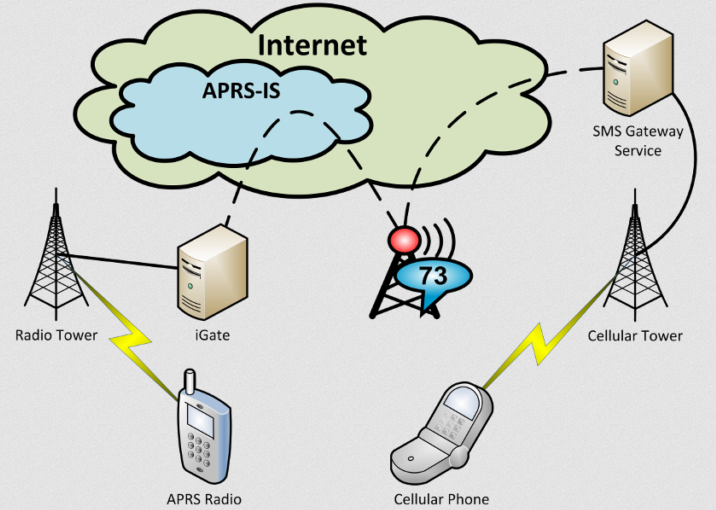
Amateur Radio Texting Using APRS

Experienced hams have been talking about using APRS messages for SMS texting to friends and family for a few years now. I was mildly interested but found messaging tedious on a handheld transceiver, as well as the brief privacy implications of APRS SMS registration a barrier to entry. However, when I finally bit the bullet and tried it out, especially with KI6NAZ’s revelations from using an Android tablet to compose messages (in Winlink), I realized that this is a fantastic and wholly viable option to traditional messaging when cell service is down in your immediate area. Hence, I present to you my documented findings of amateur radio texting using APRS. Check it out! https://bit.ly/how2smsaprs. Special thanks to KM4ACK Jason for introducing me to this topic about a year ago, and especially VE3OTB Paul for creating the SMSGTE service, a vital service worthy of donation support.  


How to Create a Multi-Mode XReflector

JerryNet is so named because one bored commute home, KG6HQD Jerry went on his DStar radio and connected to REF012A to see if anyone wanted to talk. This became a regular thing and JerryNet™ was born. Later we started talking about how to include other digital voice modes such as DMR and Fusion. We needed a cross-mode reflector so we ended up on the QuadNet Array on 757A. Someone from JerryNet threw out the idea of setting up our own multi-dv reflector similar to Quadnet’s. When I first heard this idea, I immediately thought it would be an impossibly daunting task. I had impressions of expensive hardware and codec boards and all kinds of crazy Windows applications. But thanks to the documented sharing of helpful hams like N5AMD (who helped start the reflector and website for San Antonio Digital Radio), as well as Quadnet and Kings of Digital, I was able to see that creating something like this was indeed doable. All that research led to a vision of what we wanted, and I drew that out like this:


DStar and YSF/DMR Reflectors are Live

XLX367 reflector is live! Update: February 2019: All three modes DStar, YSF, and DMR are now crosslinked! DStar REF367A (also XRF367A and DCS367A) is up an running. This is a new multi-protocol DStar Digital Voice reflector, running in the cloud. It is available for public use and is tied primarily with JerryNet communications. Also, a Yaesu Fusion YSF room 68798 is running at the same server, and is bridged to DMR Talkgroup 3128459 DMR (here’s how to connect to XLX DMR). Fusion users can talk in this YSF reflector to other Fusion users, and it is cross-linked to DMR as well for wider reach. I am currently working within the Brandmeister support process to tie the XLX reflector to a DMR master, but until then, the reflector works for all 3 ham major digital voice modes. Please visit the reflector on one of your digital voice radios and say hi!


Build Your Own DMR/DStar/Fusion Hotspot for CHEAP

In an effort to get more people on digital ham radio easily, I posted a video about how to put together your own multi-mode digital voice hotspot device very inexpensively, and with little effort. I have put together several of these and the work pretty well. Kind of like an oil change, almost anyone can do it.

https://youtu.be/LspgnvDPJvc

I admit, I used to have a purist mindset about ham radio. All these Internet-dependent modes such as Echolink, IRLP, and even analog repeater inter-linking over the Internet had me thinking “but what happens when the grid goes down?” I’ve experienced some pretty bad fails as a systems & software engineer, and also as a site reliability person constantly on-call, so I’ve come to expect that even on the best of days, parts of the Internet like to fail spontaneously and without provocation.


CW and FT8 and PSK, oh my!

In the past month, I’ve finally unblocked my antenna issues and made great strides in the digital realm of ham radio. Using the PreciseRF HG-1 magnetic loop antenna along with my RigExpert AA-600 to get the lowest possible SWR, I have found that I can get out to virtually all over the country simply from putting the antenna on the street. The loop only supports max 45W PEP, so it is definitely a low-power antenna. But I can only imagine how it would function if I were in a flat field or on a peak.


Sent first SSTV image

Using SSTV for iOS on my phone and a BTECH APRS-K1 Audio Interface Cable (albeit connected to a Kenwood TH-D74A), I just sent my first SSTV image on 145.510 MHz FM simplex. I don’t think anyone heard, but it was a proof of concept exercise. I recorded the transmission on a separate handheld, using a small voice recorder. Despite this lossy recording method, I was able to reconstruct the image pretty well using the same SSTV app. Here is the recording, give it a try with your decoder: Encoded with Scottie 1, try decoding this SSTV transmission with your own SSTV app. (here’s a media file download link) The implications of this mode are fascinating. I can imagine being in the field and needing to send a photo in a grid-down/remote situation. With just your phone (which is a camera), a cable, and a handheld, you can easily send out images of the scene. It’s basically color fax for hams! Moreover, it’s a quick method for exchanging digital QSL cards. :) This topic was covered in an EMCOMM class I took, but I did not realize the practicality of this. I thought it was “yet another digital mode” that required carrying around luxuries like a laptop computer, TNC, laptop power, and fancy antennas. The iPhone + handheld method brought this down to earth for me, and helped me realize it’s a very portable way of communicating. Here’s a list of SSTV frequencies I found: http://www.qsl.net/kb4yz/net.txt


80m RTTY

I found a load of RTTY on 80m band on Sunday night (1/7/2018). I tuned to 3580 kHz and found a particularly strong signal, so I hooked up my USB soundcard to my laptop, fired up fldigi and made attempts to reply, but I guess my QRP setup didn’t get heard in all the pileup chatter. Turns out, January 6-7 was “ARRL RTTY Roundup”, a nationwide contest to make contacts in the digital format, so it was easy to catch the conversations on almost all HF bands. I found the CQ’s in this format a bit odd, and didn’t really know how to format my responses or how to call CQ myself. I saw things like: TEST N6JJ N6JJ CQ (not real callsign), or CQ RU N6JK CQ. What? I went with the way I new how to call CQ, which was: CQ CQ DE AD6DM PSE K. (meaning: Calling any station from AD6DM please reply). No replies. There were a lot of transmissions like: W7KJ N6JK 599 5NN TU 73. I took these to mean an acknowledgement, a signal report, thank you, best regards. RTTY is a very quick format. It’s like a drive-by greeting that is over before you know it. It’s probably how hams did contest contact-gathering before the more modern semi-automated FT8 format. In any case, I want to get out there on RTTY and give it more of a try.


What is this transmission?

I checked in to W6VVR Vaca Valley Radio Club net this evening and they said post-net they’d be hopping on to 7.190MHz. Quickly set up my bugcatcher for 40m and listened, but nothing heard, except for a QSO in progress on 7.192 from Arizona to Los Angeles. So I thought I’d tune around on the new Extra sections of 7.075-7.100MHz (Hawaii and Alaska can use this for voice, but we mainlanders can’t.) Was expecting CW and perhaps some blurty digital sounds. Instead I found this: https://youtu.be/mvkWdpZFwPQ What is this? I imagine it’s a digital mode (somewhat like Olivia) but I’ve never heard anything like it. Makes me think of a harmonic alien transmission.


APRS iGate

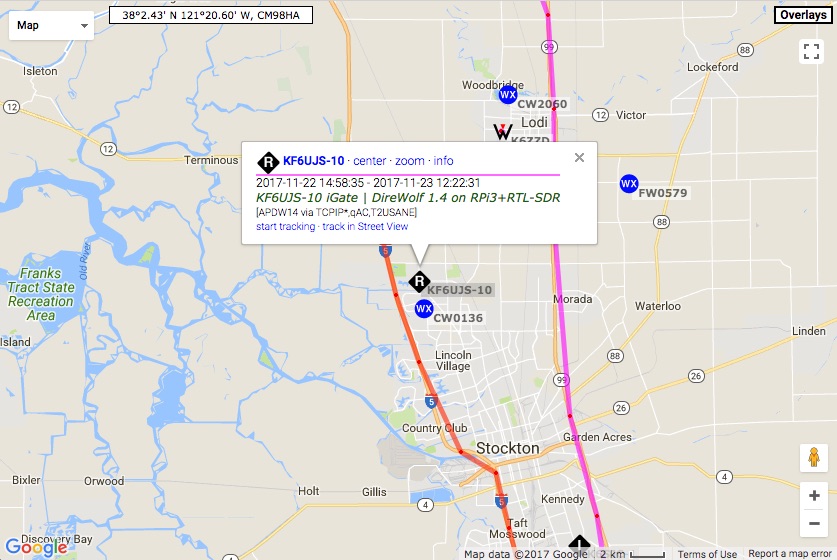
Last night I set up an Automatic Packet Reporting System (APRS) iGate to listen on 144.390 MHz for packets and report them to APRS Internet Service (APRS-IS). This is like a listening station that will improve my area APRS coverage.

My receive-only APRS station on https://aprs.fi

This can be done relatively inexpensively with a Raspberry Pi ($35), a RTL-SDR receiver ($26), and some opensource linux software available online. The latest RTL-SDR v3 is a capable little Software Defined Radio (SDR) receiver that can even receive to HF frequencies. For much cheaper than a standalone HF receiver, you can get the kit that includes a whip dipole, extension SMA cables, and mounting hardware. I lengthened the whips to 2m resonance (~19 inches each side). Using software in linux: rtl_fm and direwolf, one is able to listen for APRS traffic on 144.390 MHz, decode it, and with the Raspberry Pi  connected to the Internet, can send what it hears to the main APRS servers for visibility on aprs.fi.